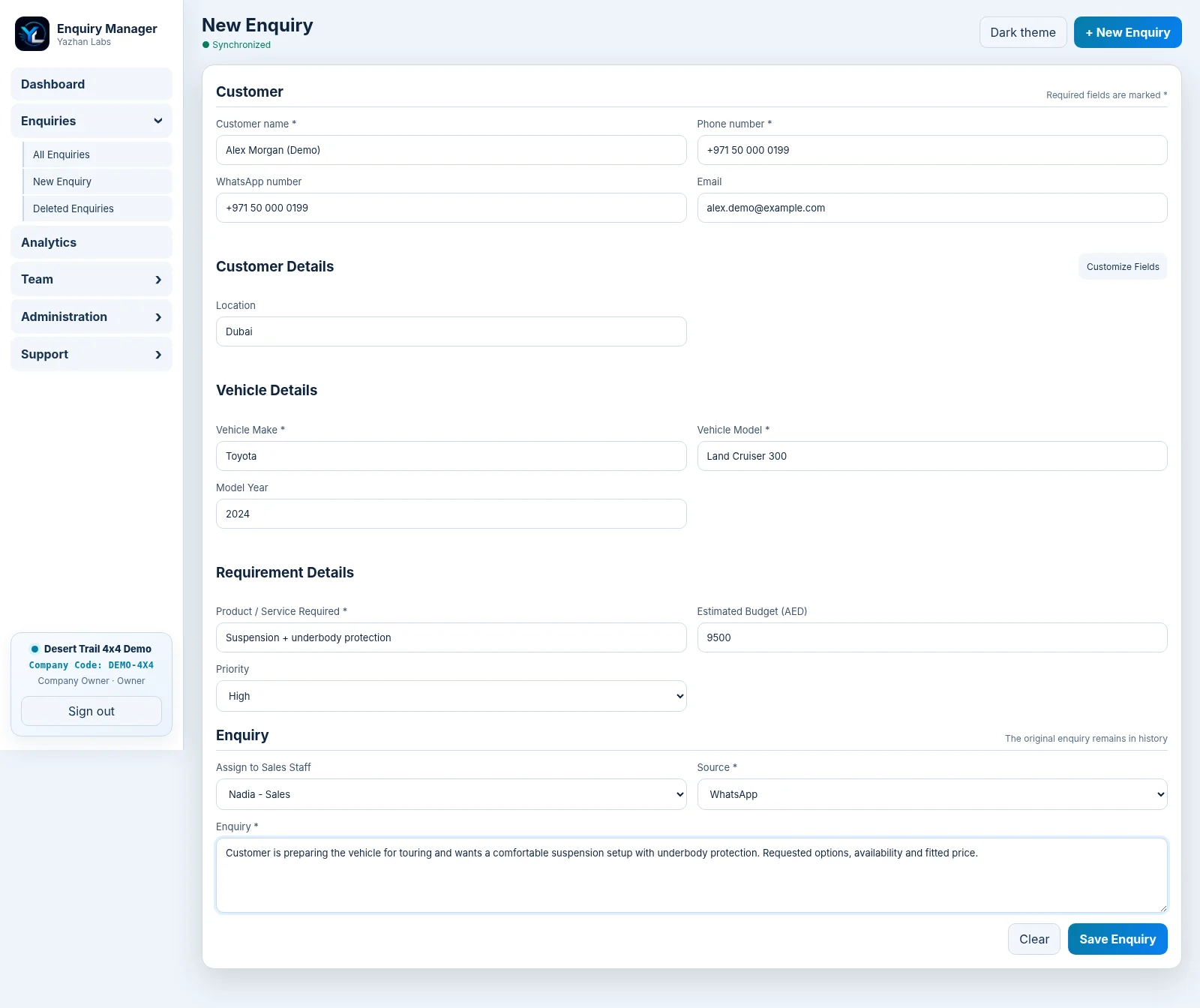
Record the customer, contact details, source, requirements and any business-specific information you need.
ENQUIRY MANAGEMENT
Yazhan Labs Enquiry Manager
Stop losing enquiries between messages, calls and follow-ups.
When enquiries arrive through WhatsApp, Instagram, phone calls, websites, referrals and walk-ins, the problem is rarely getting the enquiry — it is making sure the right person follows it through.
Yazhan Labs Enquiry Manager gives your team one structured workspace to capture every enquiry, assign responsibility, record every follow-up and see exactly what needs attention next.
No scattered notebooks. No “Who spoke to this customer?” No forgotten follow-up hidden inside somebody's phone.
Company-specific workspace · Windows + Android access · Secure browser/PWA access · Encrypted backup and restore controls
THE PROBLEM
More enquiries should mean more opportunities — not more confusion.
A customer sends a WhatsApp message. Another calls the office. Someone walks in. An Instagram enquiry reaches a different employee. One person writes it down, another promises to call back, and a few days later nobody is completely sure what happened.
That is where businesses lose sales: not because customers were not interested, but because the follow-up process was fragmented.
Yazhan Labs Enquiry Manager replaces that uncertainty with a clear operating process. Every enquiry has an owner, a status, an attendance record, a history and a next step your team can see.
THE WORKFLOW
One enquiry. One history. One clear next step.
From the first customer contact to the final outcome, Enquiry Manager keeps the full enquiry journey together.
Give responsibility to the right Sales Staff member instead of relying on verbal handovers.
Mark whether the customer has been attended, update the status and keep active work visible.
Add calls, WhatsApp updates, emails, customer replies, notes and attachments without overwriting earlier information.
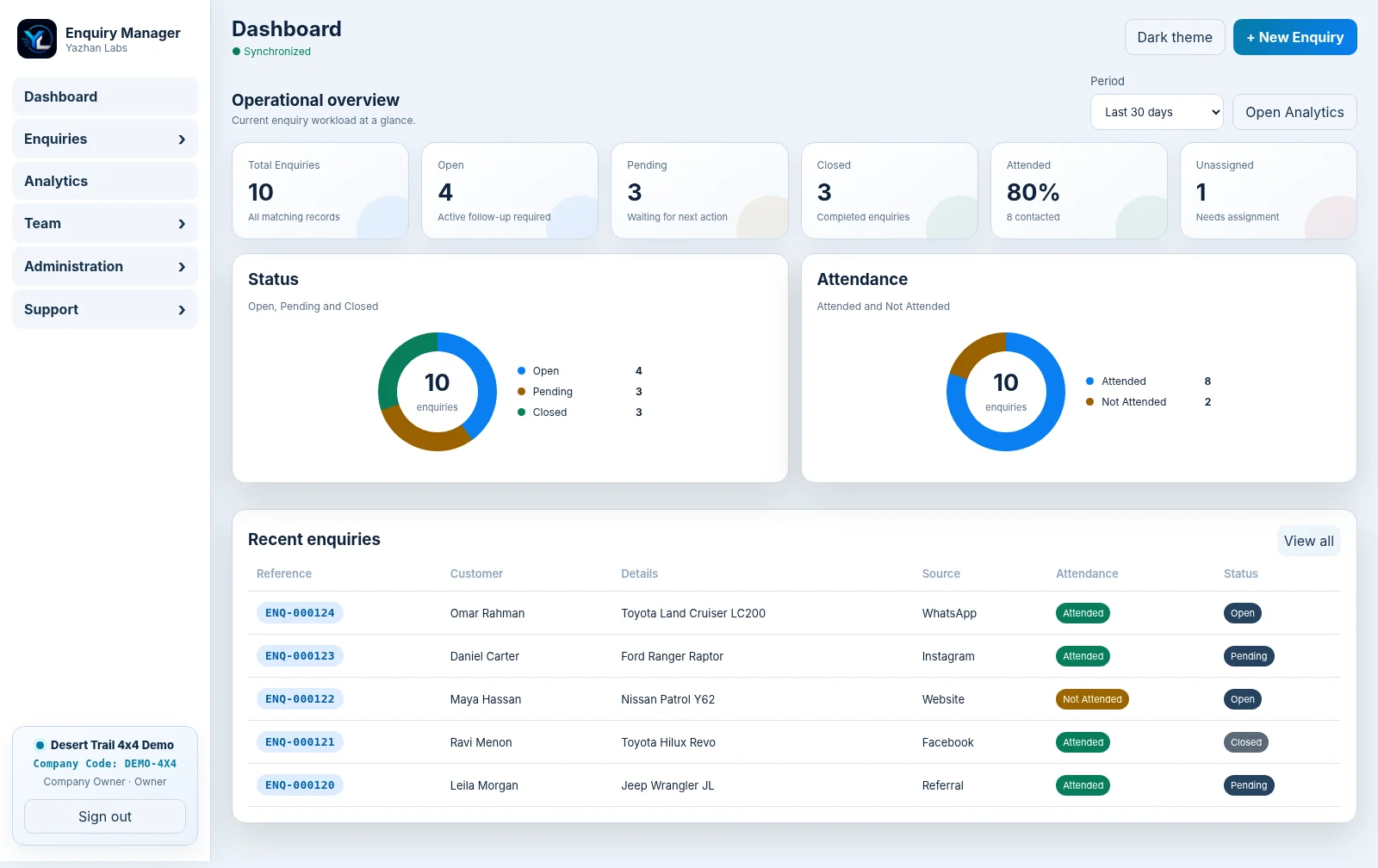
Use dashboards and analytics to see what is open, pending, closed, attended, unassigned and where enquiries are coming from.
BUILT AROUND YOUR BUSINESS
Your enquiry form should match your business — not force your business into somebody else's template.
Every company asks different questions. A workshop may need vehicle details. A property team may need location and budget. A trading company may need product, quantity and delivery requirements.
Enquiry Manager keeps the essential customer information consistent while letting the Owner create, rename, reorder, require, hide or archive business-specific fields and sections.
That means your team sees the information it actually needs — without turning the system into a complicated CRM implementation project.
FOLLOW-UP HISTORY
Stop rebuilding the story every time a customer calls back.
A customer should not have to explain the same requirement to three different employees.
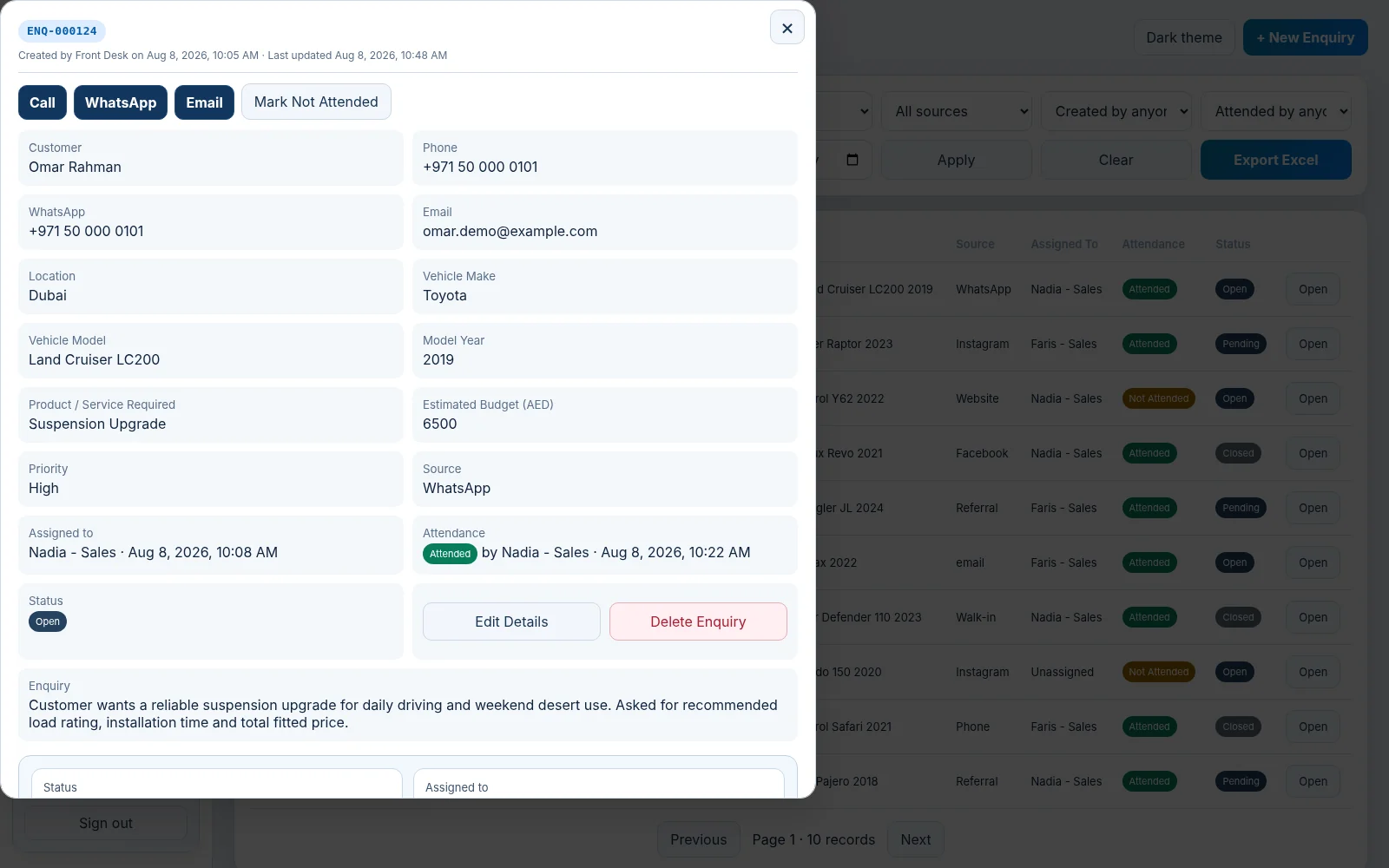
Each enquiry keeps a chronological remarks history so your team can see calls, WhatsApp messages, emails, customer replies and internal notes in context. Attach relevant PDFs, images or supporting files to the enquiry so the next person has the information needed to continue the conversation.
TEAM ACCOUNTABILITY
Everyone knows what they own. Managers know what is happening.
Assign enquiries to Sales Staff, track whether customers were attended and keep status updates visible to the team. Owners can create users, control roles and manage device access, while the activity log provides an additional record of important actions.
- Owner
- Full company administration, users, devices, backups, settings and reporting.
- Manager
- Manage enquiries, assignments and day-to-day workflow.
- Sales Staff
- Work assigned enquiries, contact customers, update attendance/status and add remarks.
- Read Only
- Give visibility without editing rights.
FIND ANY ENQUIRY
The customer remembers speaking to you. Your team should be able to find the conversation.
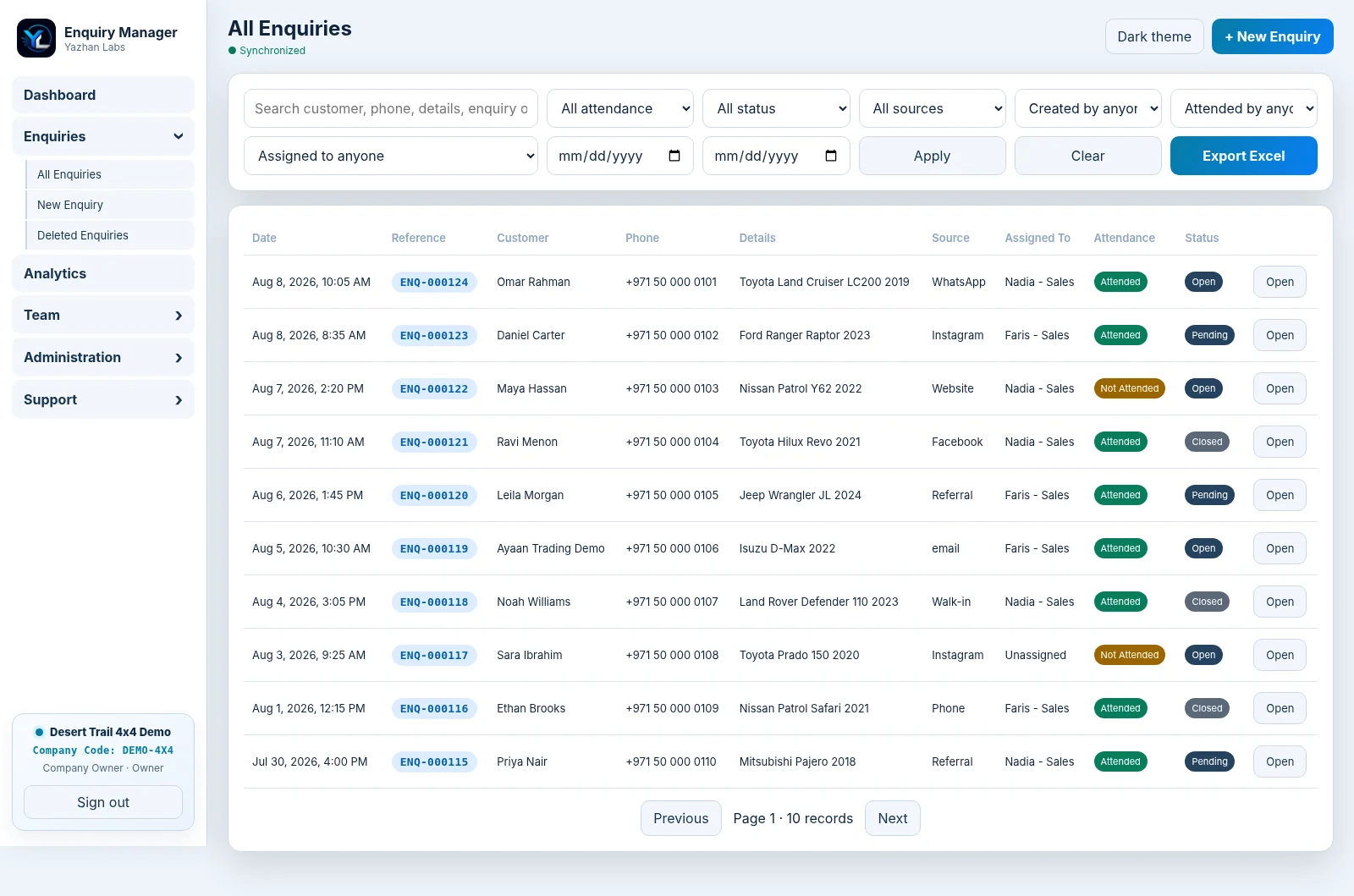
Search across enquiry information and use filters for attendance, status, source, assigned user, creator and date range. When reporting or offline analysis is needed, export enquiry data to Excel.
VISIBILITY
See where attention is needed before opportunities go cold.
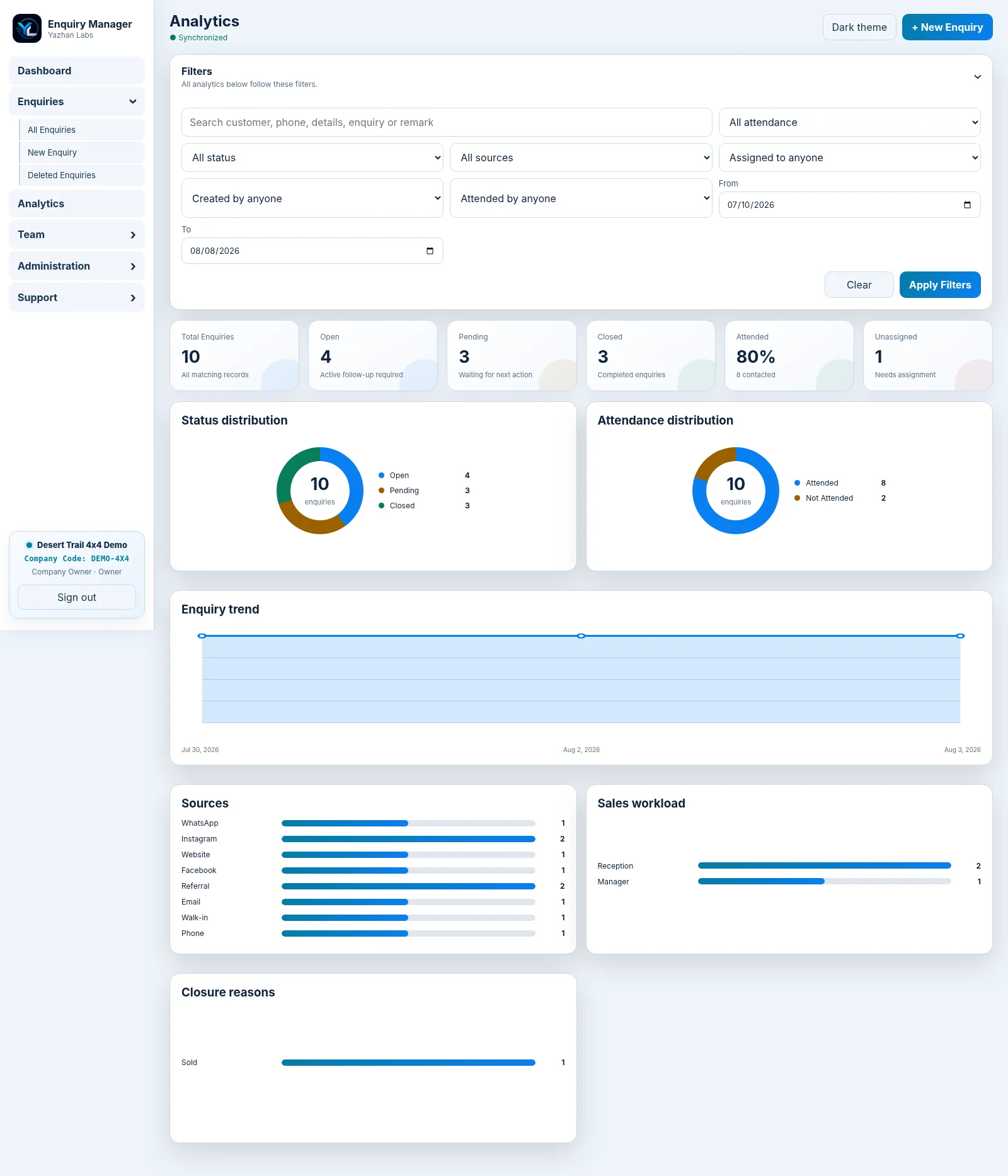
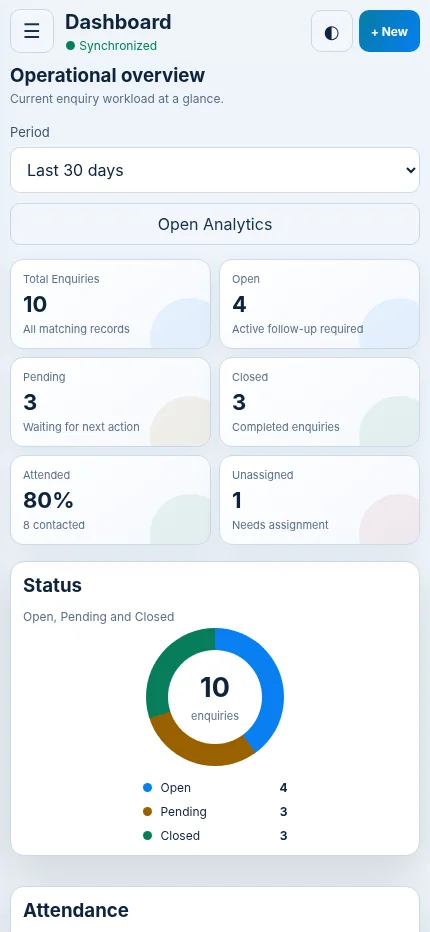
The operational dashboard gives an immediate view of enquiry volume, open work, pending follow-ups, completed enquiries, attendance and unassigned records. Analytics adds filters and visual breakdowns for status, attendance, sources, enquiry trends, team workload and closure reasons.
Instead of asking the team for updates, managers can see the workload directly.
DATA CONTROL & RECOVERY
Business records deserve more protection than a spreadsheet on one computer.
Each company operates inside its own workspace. Owners control user and device access, and encrypted company backups can be created, verified and restored when needed.
Restore protection includes a pre-restore safety backup and recovery controls designed to reduce the risk of losing the current company state if a restore is interrupted.
For attachments, the company can connect its own supported cloud storage account so new files remain in company-controlled storage.
POSITIONING
You may not need a heavy CRM. You do need a reliable enquiry process.
Enquiry Manager focuses on the work that happens between “a customer contacted us” and “we know the outcome.”
It gives growing teams the structure they need for ownership, follow-up, visibility and recovery — without asking them to redesign the entire business around an oversized CRM platform.
WORK WHERE THE ENQUIRIES HAPPEN
The office should not be the only place your team can update a customer.
Use Enquiry Manager on Windows and Android, with secure browser/PWA access for supported devices. Sales Staff can work from the same live company records instead of maintaining separate copies or sending updates back to the office for somebody else to enter.
WHO IT IS FOR
Built for businesses that sell through enquiries, quotations and follow-ups.
Enquiry Manager is especially useful when a sale does not happen in a single click and somebody needs to understand the customer requirement before the business can quote, recommend or close.
- Automotive workshops, 4x4 accessory businesses and spare-parts suppliers
- Trading and distribution companies
- Real-estate and property enquiry teams
- Service businesses and service centres
- Equipment, industrial and B2B suppliers
- Small and growing sales teams that have outgrown spreadsheets and chat-only follow-up
FAQ
Questions about Enquiry Manager
What problem does Enquiry Manager solve?
It helps enquiry-driven businesses stop losing customer context and follow-ups across WhatsApp, phone calls, social media, walk-ins, spreadsheets and individual employees. Each enquiry becomes a structured record with ownership, attendance, status, remarks and history.
Is this a full CRM?
Enquiry Manager is intentionally focused on enquiry capture, assignment, follow-up, history, analytics and recovery. It is designed for businesses that need a reliable enquiry process without the complexity of a large CRM implementation.
Can we customize the enquiry form?
Yes. The Owner can add business-specific fields, choose field types, organize them into sections, make fields required, change display order, hide them and safely archive fields while preserving historical values.
Can different employees have different permissions?
Yes. The application supports Owner, Manager, Sales Staff and Read Only roles.
Can enquiries be assigned to specific salespeople?
Yes. Enquiries can be assigned to Sales Staff so ownership is visible to the team.
Can we search old enquiries?
Yes. Search and filters help find records by customer/enquiry information, status, attendance, source, users and date ranges.
Does it support attachments?
Yes. Supporting files can be linked to enquiry records. New attachment files can use the company's connected supported cloud-storage account.
Are backups available?
Yes. Owners can create encrypted backups, verify them and restore company data. Restore workflows include safety and recovery controls.
Can we use it on mobile?
The product supports Windows and Android access and secure browser/PWA usage on supported devices. The same company records and permissions are used across devices.
Is each company's data separate?
Yes. The application is designed as a multi-company system with company-scoped records and permissions.